K-近邻算法

k-近邻(kNN)算法是一种非常简单有效的监督学习算法,该算法根据测试样本和训练样本之间的距离(在特征所构成的高维空间),对测试样本进行分类。简单地说,kNN采用的是“近朱者赤近墨者黑”的思想。

基本原理及算法

  • 输入的样本集中,每个数据都存在标签
  • 输入没有标签的新数据后,对比新数据的每个特征和样本集中每个样本对应的特征
  • 提取样本集中特征最相近的k个数据所对应的标签
  • 选择这k个标签中出现次数最多的分类,作为新数据的分类
1
2
3
4
5
6
7
8
9
10
11
12
13
14
15
16
17
18
19
20
21
22
23
24
25
26
from numpy import *
import operator

def classfy0(inX, dataSet, labels, k):
"""
inX --- test data, (1, nc)
dataSet --- train dataset, (m, nc)
label --- train label, (m, k)
k --- k classes
"""

# 计算欧式距离
sqDistances = sum((inX - dataSet)**2,axis=1) # 利用numpy的广播功能
distances = sqDistances**0.5
sortedDistIndices = distances.argsort() #从小到大排序(默认采用快排算法,返回index序列)

# 计算距离最近的k个点
classCount = {}
for i in range(k):
voteIlabel = labels[sortedDistIndices[i]]
classCount[voteIlabel] = classCount.get(voteIlabel, 0) + 1

# 排序并选择出现次数最多的类别
sortedClassCount = sorted(classCount.items(),
key=operator.itemgetter(1), reverse=True) # 按照字典的值进行反向排序
return sortedClassCount[0][0] # 取出次数最大的字典(类-次数)的类名

测试算法

生成数据集

1
2
3
4
def creatDataSet():
group = array([[1.0, 1.1], [1.0, 1.0], [0, 0], [0, 0.1]])
labels = ['A', 'A', 'B', 'B']
return group, labels
1
2
3
group, labels = creatDataSet()
print(group)
print(labels)
[[ 1.   1.1]
 [ 1.   1. ]
 [ 0.   0. ]
 [ 0.   0.1]]
['A', 'A', 'B', 'B']

测试算法

1
classfy0([0, 0], group, labels, 3)
'B'

实例1:改进约会网站

数据准备

1
2
3
4
5
6
7
8
9
10
11
12
13
14
15
16
def file2matrix(filename):
fr = open(filename)
arrayOLines = fr.readlines() # 一次性读取文件的所有信息,列表类型,每个元素为一个字符串,代表一行的数据
numberOfLines = len(arrayOLines) # 长度为行数
returnMat = zeros((numberOfLines, 3)) # 初始化,行数为训练样本个数,3表示特征个数
classLabelVector = []
index = 0

for line in arrayOLines:
line = line.strip() #去掉每行两头的空格
listFromLine = line.split('\t') #用table分割
returnMat[index, :] = listFromLine[0:3] # 前3个元素为特征
classLabelVector.append(int(listFromLine[-1])) # 最后一个元素为label
index += 1

return returnMat, classLabelVector
1
2
3
datingDataMat, datingLables = file2matrix(r'/media/seisinv/Data/course/ai/machine_learning_in_action/Machine-learning-in-action/k-Nearest Neighbor/datingTestSet2.txt')
print(datingDataMat)
print(datingLables[0:20])
[[  4.09200000e+04   8.32697600e+00   9.53952000e-01]
 [  1.44880000e+04   7.15346900e+00   1.67390400e+00]
 [  2.60520000e+04   1.44187100e+00   8.05124000e-01]
 ..., 
 [  2.65750000e+04   1.06501020e+01   8.66627000e-01]
 [  4.81110000e+04   9.13452800e+00   7.28045000e-01]
 [  4.37570000e+04   7.88260100e+00   1.33244600e+00]]
[3, 2, 1, 1, 1, 1, 3, 3, 1, 3, 1, 1, 2, 1, 1, 1, 1, 1, 2, 3]

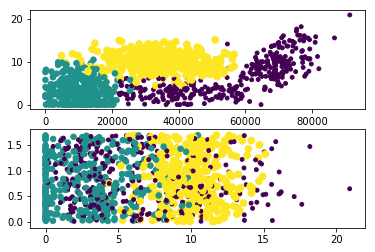
数据可视化

1
2
3
4
5
6
7
8
import matplotlib
import matplotlib.pyplot as plt
plt.figure(1)
plt.subplot(211) # 将图分成2*1大小的子图,此时占用第一个子图
plt.scatter(datingDataMat[:,0], datingDataMat[:,1], 15.0*array(datingLables), 15.0*array(datingLables))
plt.subplot(212) # 占用第二个子图
plt.scatter(datingDataMat[:,1], datingDataMat[:,2], 15.0*array(datingLables), 15.0*array(datingLables))
plt.show()
数据可视化

数据可视化

数据预处理

1
2
3
4
5
6
7
8
9
10
11
def autoNorm(dataSet):
"""
dataSet --- (m, nc)
"""
minVals = dataSet.min(0) #沿着m方向取最小值,输出(nc,),rank=1
maxVals = dataSet.max(0)
ranges = maxVals - minVals
ranges = ranges.reshape((1, dataSet.shape[1])) # 重整为(1, nc)
minVals = minVals.reshape((1, dataSet.shape[1]))
normDataSet = (dataSet - minVals)/ranges # 利用numpy的广播功能
return normDataSet, ranges, minVals
1
2
3
4
normMat, ranges, minValues = autoNorm(datingDataMat)
print(normMat)
print(ranges)
print(minValues)
[[ 0.44832535  0.39805139  0.56233353]
 [ 0.15873259  0.34195467  0.98724416]
 [ 0.28542943  0.06892523  0.47449629]
 ..., 
 [ 0.29115949  0.50910294  0.51079493]
 [ 0.52711097  0.43665451  0.4290048 ]
 [ 0.47940793  0.3768091   0.78571804]]
[[  9.12730000e+04   2.09193490e+01   1.69436100e+00]]
[[ 0.        0.        0.001156]]

验证算法

使用90%的数据用来作为训练数据(尽管kNN不需要训练过程),10%的数据用来测试算法性能

1
2
3
4
5
6
7
8
9
10
11
12
13
14
15
16
17
def datingClassTest():
hoRatio = 0.10 # ratio to validate the performance
datingDataMat, datingLables = file2matrix(r'/media/seisinv/Data/course/ai/machine_learning_in_action/Machine-learning-in-action/k-Nearest Neighbor/datingTestSet2.txt')
normMat, _, _ = autoNorm(datingDataMat)

m = normMat.shape[0]
numTestVecs = int(m*hoRatio)
errorCount = 0.0

for i in range(numTestVecs):
classifierResult = classfy0(normMat[i, :], normMat[numTestVecs:m, :], \
datingLables[numTestVecs:m], 3)
if (i%100 == 0): print ("The classifier came back with: %d, the real answer is: %d" \
% (classifierResult, datingLables[i]))
if (classifierResult != datingLables[i]): errorCount += 1.0

print("The total error rate is: %f" %(errorCount/float(numTestVecs)))
1
datingClassTest()
The classifier came back with: 3, the real answer is: 3
The total error rate is: 0.050000

测试算法

终端输入用户信息,作为测试数据,判断约会情况

1
2
3
4
5
6
7
8
9
10
11
12
13
def classifyPerson():
resultList = ['not at all', 'in small doses', 'in large doses']
percentTats = float(input("percentage of time spent playing video game?"))
ffMiles = float(input("frequency flier miles earned per year?"))
iceCream = float(input("liters of ice cream consumed per year?"))
datingDataMat, datingLables = file2matrix(r'/media/seisinv/Data/course/ai/machine_learning_in_action/Machine-learning-in-action/k-Nearest Neighbor/datingTestSet2.txt')
normMat, ranges, minValues = autoNorm(datingDataMat)
inArr = array([ffMiles, percentTats, iceCream])

# 利用训练数据的参数(minValues, ranges)对测试数据归一化
classifierResult = classfy0((inArr - minValues)/ranges, normMat, datingLables, 3)
print("You will probably like this person: ", \
resultList[classifierResult-1])
1
classifyPerson()
percentage of time spent playing video game?10
frequency flier miles earned per year?10000
liters of ice cream consumed per year?0.5
You will probably like this person:  in small doses

实例2 手写识别系统

数据预处理

1
2
3
4
5
6
7
8
9
10
11
def img2vector(filename):
"""
将32*32的图像文件转化成1*1024的向量
"""
returnVec = zeros((1, 1024))
fr = open(filename)
for i in range(32):
lineStr = fr.readline() #读取文件一行的信息
for j in range(32):
returnVec[0, 32*i+j] = int(lineStr[j])
return returnVec

验证算法

1
2
3
4
5
6
7
8
9
10
11
12
13
14
15
16
17
18
19
20
21
22
23
24
25
26
27
28
29
30
31
32
from os import *
from io import *
from numpy import *
def handwriteClassTest():
hwLabels = []
trainingFileList = listdir('trainingDigits') #获取训练目录内容
m = len(trainingFileList)
trainingMat = zeros((m, 1024))

for i in range(m):
fileNameStr = trainingFileList[i]
fileStr = fileNameStr.split('.')[0]
classNumStr = int(fileStr.split('_')[0])
hwLabels.append(classNumStr)
trainingMat[i] = img2vector('trainingDigits/%s' %fileNameStr)

testFileList = listdir('testDigits') #获取测试目录
errorCount = 0.0
mTest = len(testFileList)
for i in range(mTest):
fileNameStr = testFileList[i]
fileStr = fileNameStr.split('.')[0]
classNumStr = int(fileStr.split('_')[0])
vectorUnderTest = img2vector('testDigits/%s' %fileNameStr)
classifierResult = classfy0(vectorUnderTest, \
trainingMat, hwLabels, 3)
if (i%100 == 0): print("the classifier came back with: %d, the real number is: %d"\
%(classifierResult, classNumStr))
if (classifierResult != classNumStr): errorCount += 1.0

print ("\n the total number of errors is: %d" %errorCount)
print ("\n the total error rate is: %f" %(errorCount/float(mTest)))
1
handwriteClassTest()
the classifier came back with: 4, the real number is: 4
the classifier came back with: 1, the real number is: 1
the classifier came back with: 2, the real number is: 2
the classifier came back with: 3, the real number is: 3
the classifier came back with: 4, the real number is: 4
the classifier came back with: 5, the real number is: 5
the classifier came back with: 6, the real number is: 6
the classifier came back with: 7, the real number is: 7
the classifier came back with: 8, the real number is: 8
the classifier came back with: 9, the real number is: 9

 the total number of errors is: 12

 the total error rate is: 0.012685

使用算法

可以使用自己手写的数据输入

结论及讨论

结论

kNN算法简单有效,有以下特点:
> + 优点:精度高、对异常值不敏感、无数据输入假设
> + 缺点:计算复杂度高(需要计算每个输入样本和训练样本集中所有样本的距离),空间复杂度高(需要存储所有的训练样本数据)

讨论

周志华在《机器学习》一书对kNN的点评: > + kNN虽然简单,但是它的泛化错误率不超过贝叶斯最优分类器错误率的2倍
> + 上述结论的前提是测试样本附近任意小的距离内总能找到一个训练样本,当属性维度为20时,每个维度要求\(10^3\),则一共需要\(10^60\)个样本。实际情况往往成千上万个属性,要满足密度采样条件所需要的样本是无法达到的天文数字。另外,计算这么多样本与测试样本之间的距离,也不容易。实际上,在高维情况下出现的样本稀疏、距离计算困难,是所有机器学习算法共同面临的严重障碍,被称为“维数灾难”(curse of dimensionality)。

参考资料

  1. Peter Harrington, Machine learning in action, Manning Publications, 2012
  2. 周志华,机器学习,清华大学出版社, 2016